
What's new · October 2026
Your AIs just got smarter together.
BrainMate already gives every AI you use one shared brain. These upgrades make that brain look after your plans, show its work, and pull the right memory first.
See it first
A step finished in Claude. Picked up in ChatGPT.
No copy and paste, no re-explaining. ChatGPT already knew the launch date, the offer and the story behind the brand. 31 seconds, sound on.
Plan-reset reminders.
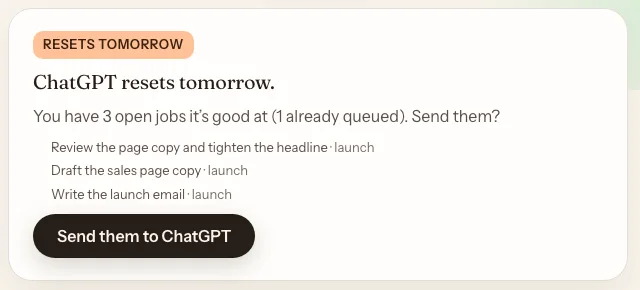
Most AI plans reset on a set day, and whatever you didn't use is gone. BrainMate now spots a plan about to reset and lines up the work it's good at, so you get what you paid for.
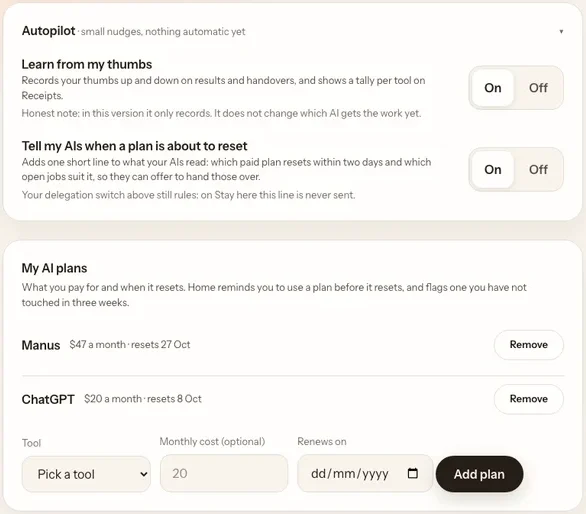
- Add your plans once in Settings, My AI plans: the tool, what it costs, the day it renews.
- Two days before a reset, Home shows a card: "ChatGPT resets tomorrow. You have 3 open jobs it's good at."
- Tap Send them. Each job is queued for that AI. Open it and say "continue".
It only uses jobs you already have. It never makes up work.
The unused-plan check.
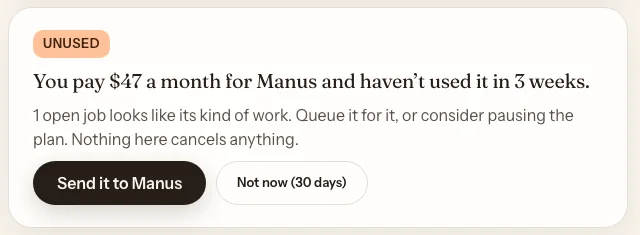
Paying for an AI you forgot about? If a paid plan hasn't been touched in three weeks, BrainMate tells you once, calmly.
- You see: "You pay $47 a month for Manus and haven't used it in 3 weeks."
- Queue a job for it with one tap, or tap Not now and it stays quiet for 30 days.
- Nothing here cancels anything. You stay in charge of your subscriptions.
Receipts, and your thumbs.
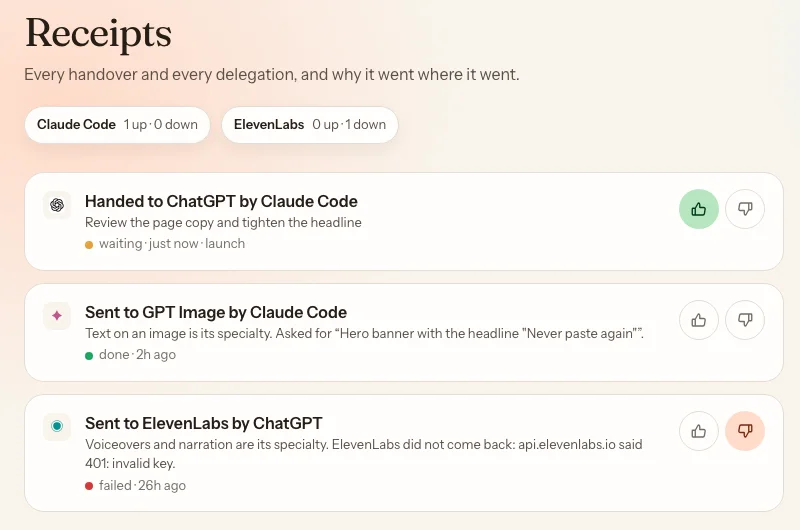
A new Receipts screen lists every handover and every job sent to a specialist AI, newest first, each with one plain line saying why it went where it went.
- Open Receipts from the side menu.
- Read the why: "Sent to GPT Image: text on an image is its specialty."
- Tap thumbs up or down on any result. The tally at the top shows which AI is doing your best work.
Your ratings are recorded from day one. Soon they'll help BrainMate pick the right AI for each job.
Smart Recall. The right memory, first.
When one of your AIs asks the brain a question, BrainMate now reads the best matches and puts the one that actually answers it at the top. Your latest decision beats last month's brainstorm.
"What did we decide about pricing?"
Top result: an old note full of the word "pricing" from a brainstorm.
"What did we decide about pricing?"
Top result: the actual decision, "Pricing locked at $397 lifetime."
Autopilot, your call.
Everything above works with no setup beyond adding your plans. In Settings, Autopilot you choose how much more BrainMate does:
- Learn from my thumbs, on by default. Records your ratings.
- Tell my AIs when a plan is about to reset, off by default. Turn it on and your AIs offer to hand work over before a reset.
- Prefer things simple? Pick Stay here on your main switch and nothing nudges your AIs at all.
And a few more
Smaller upgrades you'll feel.
Faster start
Your AIs load their memory about 40% faster at the start of each chat.
Honest home screen
Tools you removed no longer hang around as "quiet". When it says everything's in sync, it is.
Fresh new look
A new BrainMate logo: two AIs, one endless shared memory in the middle.
More tools
Manus now connects in one click, alongside Claude, ChatGPT, Gemini, Grok, Cursor, Codex and Hermes.
Security update
A critical fix in the framework BrainMate runs on, patched straight away.
Free for you
Every upgrade here is already switched on in your account. Lifetime buyers get them all.
 Claude
 ChatGPT
 Gemini
 Grok
 Cursor
 Codex
 Hermes
 Manus
Every AI. One shared brain.
Switch tools without starting over.
Already a member? Sign in at brainmatehq.com/login and it's all there. New here? Grab a spot and connect your first AI in about a minute.